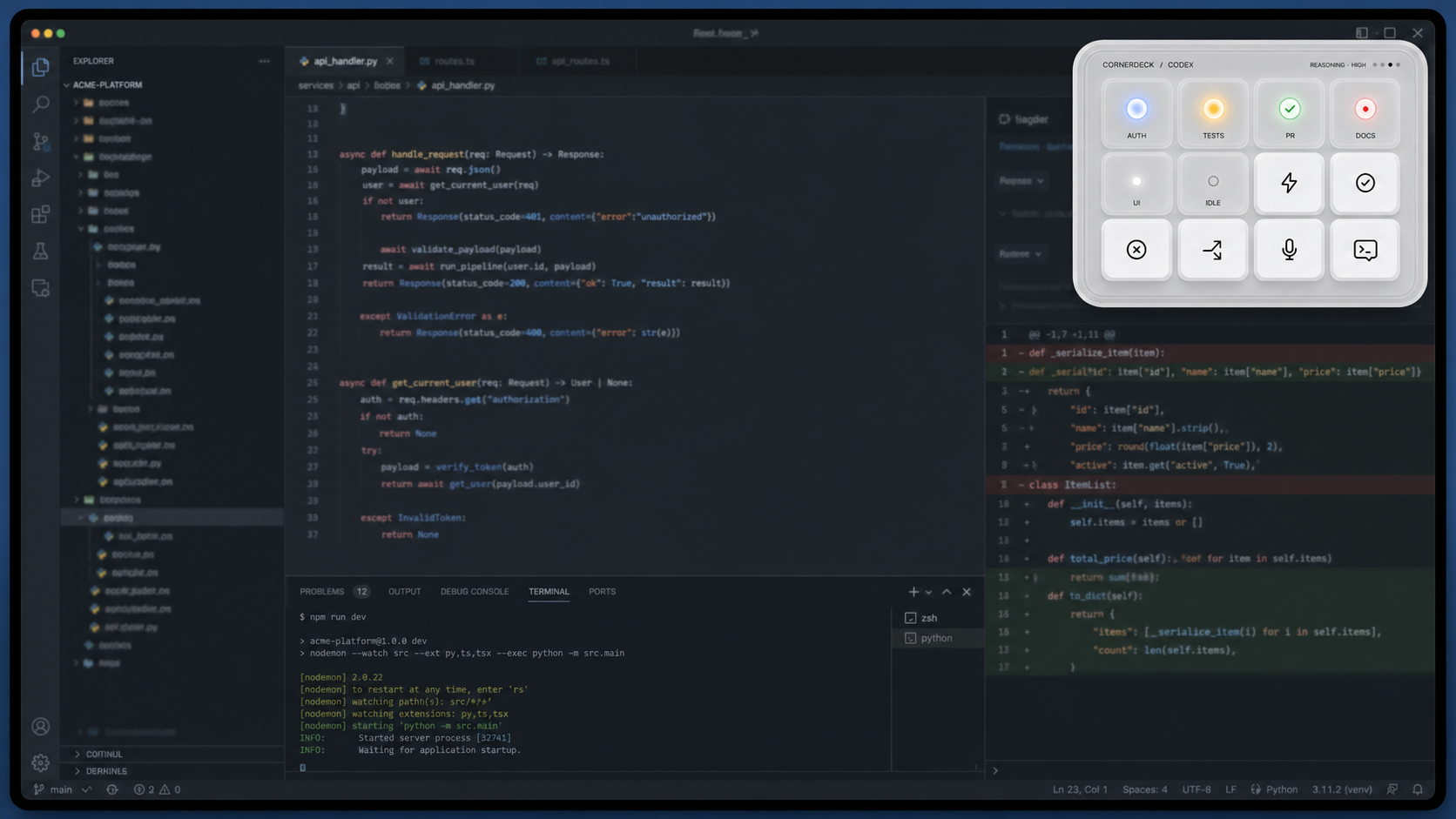
LIVE / 04 TASKSEvery task, in sight.Select a key to inspect its state. Observing
01
04
Native control surface for Codex
Your Codex work, out in the open.
Cocodeck turns your Codex Desktop tasks into a live, interactive software deck. See
what is running,
catch the moment you are needed, and continue finished work from one always-ready
desktop surface.
Direct download. No App Store. Windows build coming later.
Observe: Atlas is running; Billing, Release, and Docs are idle.
02 / Catch the handoff
The amber light means Codex needs you.
Approval and input requests rise above the noise. One task key changes state, so
you know exactly where to respond without searching through tabs.
Signal
Approval needed
Action
Open exact task
03 / Keep the thread
Finished does not mean disconnected.
A green wave marks unread work. Open the result, write the next instruction, and
continue in the same Codex thread—without rebuilding context.
Signal
Complete · unread
Action
Review + follow up
04 / Shape the routine
Turn repeated moves into a workflow.
Sequence, parallelize, pause for approval, retry, and resume. The same compact deck
becomes a launch surface for the work you run every day.
Mode
Workflow Studio
Building blocks
Sequence · parallel · approval
32root tasks · maximum view
4semantic task signals
1:1exact thread handoff
Built around the official Codex app-server surface.
The real working surface
A peripheral for the work that lives between windows.
Cocodeck stays at the edge of your desktop, close enough to act and quiet enough to
leave your editor focused.
COCODECK / LIVELOCAL SURFACE
01
State light stays visible while you work.
02
Completed output opens in the same compact surface.
01
Live task awareness
Running, waiting, complete, and error states are translated into calm, distinct light
you can read in peripheral vision.
LIVE · ALL TASKS · up to 32 roots
02
Exact thread continuity
Read the final response and send a follow-up to that same task from the deck.
Review · compose · resume
03
Usage and accounts
See official rate-limit windows and move between isolated managed Codex profiles.
Official account + rate-limit surfaces
04
Focus-preserving by design
A native floating panel surfaces what matters without taking keyboard focus from the
work already in front of you.
Native shell · local-first state
One continuous loop
From background work to the next decision.
01
Observe
Cocodeck finds your active root tasks.
Each task keeps a stable place while Cocodeck is running and updates as Codex works.
READ-ONLY DISCOVERY
02
Respond
A state change tells you where attention is needed.
Open the exact task for approval, input, a completed result, or an error.
SEMANTIC SIGNALS
03
Continue
Send the next instruction without losing the thread.
Stay in Cocodeck or hand off to the exact Codex task or CLI when needed.
EXACT HANDOFF
A deliberately narrow trust boundary
Your account secrets stay with Codex.
Cocodeck reads the minimum local state required to show your work. Raw prompts,
reasoning, full paths, and provider credentials are not exposed in its task surface.
01 Local-first task observation
02 Isolated managed profiles
03 Unsupported controls fail closed
Codexaccount + tasks
verified local boundary
Cocodeckstate + exact controls
Nothing here pretends to be a cloud account proxy.
Developer Preview 0.1.0
Put the deck within reach.
Download Cocodeck directly for Apple silicon. This preview is Developer ID signed but
not yet notarized and has no automatic updater; macOS may require an explicit first-open
confirmation.
Requires Codex CLI 0.144.4 or 0.144.6. After the first blocked launch, open
System Settings → Privacy & Security and choose Open Anyway only after verifying the
checksum above.
Before you install
Useful details, without the fine-print fog.
01 What exactly is Cocodeck?
Cocodeck is an independent desktop companion for Codex. It shows live task state,
completed results, approval attention, Usage, managed accounts, and reusable
workflows in a compact native control surface.
02 Is this an official OpenAI product?
No. Cocodeck is an independent product and is not affiliated with or endorsed by OpenAI.
03 Does it replace the Codex app or CLI?
No. It complements them. Cocodeck keeps task state and frequent controls close, then
hands off to the exact Codex task or CLI when the full workspace is the better tool.
04 Which platforms are available?
The current direct-download preview is for Apple silicon Macs. Windows code paths and
CI exist, but a public Windows installer is not available yet.
05 Why is the preview not on the App Store?
Cocodeck uses native floating-window behavior that fits direct distribution. This
preview is Developer ID signed, but it is not notarized.
06 Does Cocodeck store my Codex credentials?
The product is designed so account secrets stay with Codex. Managed profiles are
isolated and unsupported or unverifiable controls fail closed.
07 What do I need to use it?
You need Codex CLI 0.144.4 or 0.144.6. If Cocodeck cannot verify the executable,
version, account, or expected data shape, it reports that surface as unavailable
instead of substituting demo data.
Talk to the builder
Questions, edge cases, or a workflow worth sharing?
Send a note. Product questions, direct-build issues, and thoughtful feedback all land
in the same place.